
 Highway
 Area C, Milan
 Affiliated Parking Lots
 Strait of Messina Ferry
 Fuel
Fuel
 Electric Charging
 Blue Stripes
 Taxi
Taxi
 Scooter
 Bike Sharing
 Scooter Sharing
 Trains
 Ships and Ferries
title
sdfsdfds

For those who do not have employees

For businesses with 2 to 150 employees

For companies with 150 or more employees

Find out how to activate the offer and use the included mobility services.
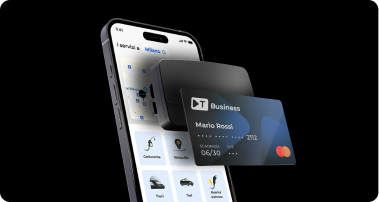
This is the new Telepass Business offering designed for businesses and independent professionals. A comprehensive solution for mobility, payments, and reporting, featuring a Telepass device, a dedicated app, and a prepaid card to manage:
Call us at: 06 871 550 97.
If you’re a self-employed professional or freelancer not registered with the Chamber of Commerce (without a Chamber of Commerce certificate), TBusiness Pro is the plan designed for your business. It includes a Telepass device, a dedicated app, a prepaid card, and comprehensive mobility solutions. TBusiness Pro meets all your needs for mobility, payments, and expense reporting. You can sign up online in just a few minutes or by calling 06 87155097.
If you are a small or medium-sized business with up to 150 employees, you can fill out this form or call the toll-free number 06 87155097 from Italy or abroad, Monday through Friday from 9:00 a.m. to 6:00 p.m.
Are you a freelancer not registered with the Chamber of Commerce (no Chamber of Commerce registration)? Discover the benefits of TBusiness Pro.
With TBusiness, you can deduct travel expenses and claim a 100% VAT deduction on all business tolls.
Cashback is a refund of a percentage of the purchase amount that will be credited back to the company's e-money account once payment for the services has been completed. The following cashback offers are always available:
You can get the following services:
Drive Package
Move Package
Card Package
A personalized prepaid card for your employees linked to the company’s e-money account for expenses: hotels, restaurants, and everything needed for business trips, with a special 0.75% cashback on every transaction.
Corporate Fleet
To purchase devices to be assigned to your company vehicles used for business purposes, not assigned to employees.
Yes. You can also transfer the devices you already own to the TBusiness plan to manage them from a single portal. However, you cannot transfer Viacard cards to TBusiness.
You can do it here.
You can find all the information in the support section of your company's dedicated portal. You can access it from here.
We evaluate the maximum number of devices that can be associated with your company on a case-by-case basis.
If you have received an agreement code from a Telepass sales representative, you will need to enter it when prompted during registration so that your company and the agreed-upon contract terms can be recognized. If you do not have a code, proceed without entering anything.
If you have received an agreement code, you can proceed with registering your company on the web portal at the link provided by your Telepass sales representative. Continue by following the instructions for entering your information, and be sure to enter the code when prompted: this will allow us to identify your company and the contract proposal agreed upon with the sales representative.
We carefully review membership applications to ensure safety. If your application was not approved, you can consider the offer we sent you via email.
If you haven't received a response from us yet, please wait a few more days. We’ll be in touch!
You can try again by clicking “Resend.” If that doesn’t work either, make sure you’ve entered the correct phone number and that you have cell service.
You have only a few minutes to enter the code we sent you.
You can try again by clicking “Resend.” Wait for a new text message and enter the latest code you received. The old one will no longer work.
We carefully review membership applications using criteria designed to ensure security.
If you haven't received our response yet, please be patient for a few more days. We'll be in touch!
Whether your request is accepted or not, you will receive a notification via email.
If you haven't received anything and have already checked your spam folder, please wait a few more days. We'll be in touch!
Scan the QR code to download the app.

lkjflkasdjkfljdsl

sdfsdfds
Track expenses, devices, and invoices; update your information; and keep your business’s mobility under control at all times.

Find out how to link it to Telepass and manage tolls and business expenses in a centralized, secure, and traceable way.
Discover Viacard with Telepass
Discover TBusiness and get instant access to all the Telepass benefits: device, app, prepaid card, and services for your business travel.
Discover the best deals